
ATIS App
iawix ltd.Weather
4.225.00 Reviews
- Version
- 3.6.2
- Installs
- 10.00K
- Age Rating
- Everyone
Screenshots
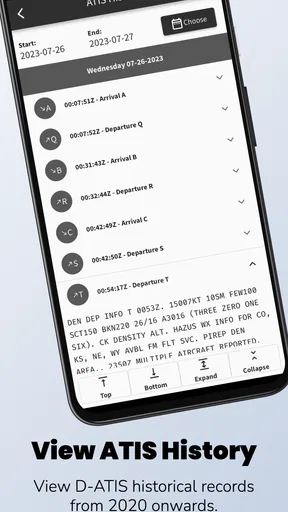
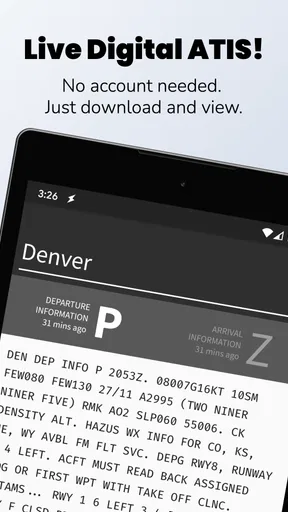
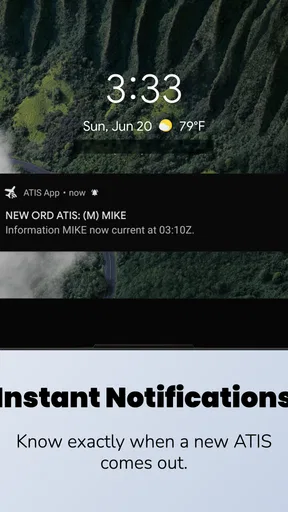
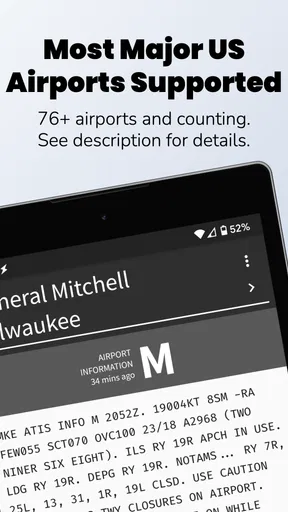
Our Review of ATIS App
 Analysis by Appyee
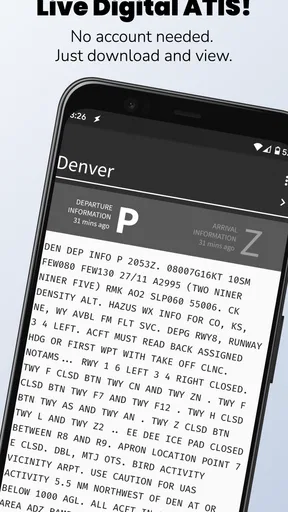
ATIS App is a focused weather tool for people who need to read live Digital ATIS reports from the FAA rather than browse a general forecast. I found its appeal quickly: it points my attention toward the information that matters before an airport operation, instead of surrounding it with maps, lifestyle forecasts, alerts, and unrelated weather content. That narrow purpose is also the key to deciding whether it deserves a permanent place on your phone.
For a pilot, student pilot, flight instructor, dispatcher, or aviation enthusiast, an app built around airport information can be more useful than a familiar weather app. For someone who simply wants tomorrow’s temperature or a rain prediction for a commute, it is the wrong tool. My overall impression is that ATIS App is valuable when aviation weather is part of your routine, but its lasting usefulness depends heavily on how often you actually need current airport reports.
What the first week feels like
The first-week appeal comes from the app’s directness. Its store summary describes live Digital ATIS weather reports from the FAA, and that tells you exactly where it fits: this is not trying to replace a full aviation planning system or a broad consumer forecast service. I can open it with a specific question in mind—what is the current airport information?—and stay focused on that question.
That focus makes the app easier to understand than many aviation tools that combine charts, forecasts, notices, flight planning, radar, and airport details in one crowded interface. A specialist app can be refreshing when I am standing at an airport, preparing for a lesson, or checking conditions before deciding whether it is worth continuing with a planned activity. The information is more operationally relevant than a simple temperature card.
There is also a useful mental distinction here. A normal weather app tells me what the atmosphere may feel like in a general location. An ATIS report is tied to airport operations and presents information in the format aviation users expect. That difference matters when I am trying to build a preflight habit. I am not just checking whether the day looks pleasant; I am checking the current airport information that may affect how I interpret the situation.
A practical airport routine
Imagine arriving early for a training flight. I would use a general weather source for the wider forecast, visibility trends, and planning context, then open this app for the current Digital ATIS report. That two-step workflow is more sensible than forcing one app to do everything. ATIS App works best as the quick, specialized checkpoint inside a broader routine.
One non-obvious benefit of that separation is reduced distraction. When an app has only one obvious job, I am less likely to confuse a general forecast with current airport information. It encourages me to treat the report as one piece of operational awareness rather than as a complete weather briefing. That is a strength, provided I remember that a focused ATIS reader is not a substitute for proper flight preparation.
The app is free to install, which makes this first-week experiment easy. Its content rating is Everyone, so the presentation is not aimed at a narrow age group. The developer is iawix ltd., and the app has built a modest footprint with over ten thousand installs. An average rating of 4.2 from dozens of ratings suggests that many users find the focused idea worthwhile, although I would not treat that score as proof that it suits every aviation workflow.
Where the early experience can disappoint
The same narrow design that makes the app approachable can make it feel limited beside a full aviation platform. If I want route planning, airport diagrams, NOTAMs, forecasts, radar, wind layers, or a detailed briefing in one place, I would need another service. That is not a flaw in the central idea, but it does affect the first impression for users who expect an all-in-one cockpit companion.
There is another important expectation to set: a live report is useful only when it is current and relevant to the airport I care about. I would not open the app, glance at one report, and assume I had completed every weather check. The safest workflow is to use it as a targeted source, then cross-check the rest of the information required for the flight. Its simplicity is helpful, but simplicity can tempt people to overestimate what the app covers.
Why it may or may not survive beyond the first month
Novelty fades quickly with specialist apps. After the first few uses, the question becomes whether ATIS App saves enough time or improves enough confidence to remain part of my routine. In my view, it can earn that place for users who regularly visit airports supported by the service and want a fast way to check Digital ATIS information. The recurring value is practical rather than entertaining: the app can become a small, repeatable step before a flight.
For a student pilot, that repeatability may be especially useful. Instead of treating airport information as something to search for only when an instructor asks, I can make it part of preparation: identify the airport, read the current report, note the operational details that matter, and then continue with the rest of the briefing. The app does not need to be opened every day to be useful. It needs to be reliable and convenient on the days when the information matters.
For instructors, the value is slightly different. A focused ATIS reader can support a teaching habit in which students learn to distinguish current airport information from broad consumer weather. I would still want other sources available, but this app can serve as a quick starting point when discussing what is happening at the field right now. Its limited scope may actually help beginners understand one layer of the overall briefing process.
Recurring value depends on your airport pattern
The strongest long-term use case is a person who repeatedly operates around airports where FAA Digital ATIS reports are relevant. If my flying is occasional, remote, or centered on locations that do not provide the kind of report I expect, the app’s value drops sharply. A general aviation weather application may be a better permanent choice if I need broad coverage and use weather information for many activities outside aviation.
This is the first important trade-off: specialization creates clarity but reduces versatility. A general weather app can serve me during a commute, a weekend trip, and a flight-planning session. ATIS App is more likely to sit unused between aviation-related tasks. That does not make it poor value; it means I should judge it by the quality of its specific moments rather than by how often I open it casually.
The app’s current version is 3.6.2, and it was released on January 30, 2020. Those details give the product a longer history than a brand-new utility, but they also reinforce my preference for checking that it still fits my current workflow after installing it. A specialist tool earns long-term trust through consistent usefulness, not simply through having been available for a long time.
How it compares with familiar alternatives
Compared with a standard weather app, ATIS App is better when I need airport-specific operational information and worse when I need an easy overview of the day. A consumer app usually wins for hourly forecasts, rain timing, temperature, and everyday planning. This app wins when the question is specifically about live Digital ATIS information from the FAA.
Compared with a full aviation planning suite, it is likely to feel lighter and less demanding. That can be an advantage when I already have a preferred source for charts and planning but want a separate, quick ATIS check. It becomes a disadvantage if I dislike switching between applications or want one consolidated briefing screen. I would choose this app as a companion, not automatically as my only aviation weather resource.
Compared with manually searching for airport information through a browser or a larger aviation portal, a dedicated app may reduce friction during a rushed preflight. The benefit is not necessarily a richer feature set; it is the possibility of making one narrow task easier to repeat. That is the kind of convenience that can survive past the first week, especially when I use the same airports often.
Maintenance, fatigue, and the small costs of keeping it useful
The maintenance burden appears modest because the app has a narrow purpose, but a low-maintenance interface does not remove the responsibility of maintaining a good workflow. I would keep my broader weather and flight-planning sources available, confirm that the relevant airport report is current, and avoid treating one screen as a complete go/no-go decision. The app may be quick to consult, yet the surrounding habit still needs care.
That distinction is important for anyone who wants a dependable aviation routine. The app can reduce the effort of obtaining one kind of information, but it cannot make the entire briefing process automatic. I would still verify the airport and the timing of the report before relying on what I read. A report that was useful a short while ago may not represent the same situation later, so the habit should be tied to the moment of use.
What can create fatigue over time
The main source of fatigue is repetition without broader context. If every use consists of opening the app, reading a report, and then moving to several other tools for everything else, I may eventually decide that a larger aviation app is more convenient. The narrow design is efficient for one task, but repeated app switching can outweigh that efficiency for users who prefer consolidated information.
Another source of fatigue is using a specialist tool when I do not actually need its specialty. If I am checking whether to carry an umbrella, this app adds unnecessary steps. If I am planning a flight, however, the same narrowness becomes meaningful. The right question is not whether it is more powerful than a general weather app; it is whether its specific report access solves a recurring problem for me.
In-app purchases are listed at $4.99 per item. I would consider that detail before building the app into a long-term setup, especially if I am comparing it with a broader service that already covers several aviation needs. The free entry point makes testing straightforward, but any purchase decision should follow real use rather than the first impression. I would first confirm that the app fits my airports, timing, and preferred briefing sequence.
Three habits that make the app more useful
First, I would use it at a consistent point in preparation rather than opening it randomly. For example, I might check the current airport report after reviewing the broad forecast and before moving to airport-specific planning. This prevents the app from becoming an isolated glance and gives the information a clear place in my decision process.
Second, I would read the report as a current operational snapshot, not as a replacement for trend information. A Digital ATIS report can answer a focused airport question, while a wider forecast helps me understand what may happen later. Keeping those roles separate is one of the most important practical lessons when using a specialist weather app.
Third, I would test the app around the airports I actually use before depending on it. An app can be well designed in principle and still be a poor fit if my regular destinations do not provide the information I need in the way I expect. This quick trial is more useful than judging it by its rating or by a generic promise of convenience.
Who should keep it installed?
I would recommend ATIS App to pilots and aviation learners who want a dedicated way to check FAA Digital ATIS reports without navigating a much larger platform. It is also a reasonable companion for instructors and frequent airport users who value a repeatable, focused checkpoint. The free price makes it easy to evaluate, and the Everyone rating means there is no age-specific barrier in the presentation.
I would be more cautious recommending it to occasional travelers, casual weather watchers, or anyone looking for a complete flight-planning solution. Those users may get more lasting value from a general weather application or an aviation suite that combines forecasts, airport data, charts, and planning in one workflow. Installing a specialized app only to use it once or twice can create more clutter than convenience.
I would also skip making it my sole source of weather information. That is not because the focused purpose is weak; it is because aviation decisions require context. I want the ATIS report, but I also want the other information appropriate to the flight, including the broader forecast and any operational details handled elsewhere. The app works best when I give it one clear job and do not ask it to become something it was not designed to be.
My long-term verdict
After the initial appeal wears off, ATIS App remains useful for a specific audience because its purpose is easy to remember and easy to place in a preflight routine. It is not an app I would open for general weather, and it does not replace a complete aviation briefing system. Its lasting value comes from being a focused tool that can make one recurring step quicker and more deliberate.
My recommendation is therefore conditional but positive: install it if FAA Digital ATIS reports are part of your regular aviation preparation, then judge it over several real airport checks rather than one casual launch. If it consistently saves you time and fits beside your existing sources, it has earned its space. If you rarely need airport reports or dislike moving between specialist tools, a broader alternative will probably serve you better.
The best reason to keep ATIS App is not novelty; it is habit. When used as a targeted checkpoint, it can remain quietly useful month after month. When used as a general weather app, it will feel too narrow. That honest boundary is what makes the product easy to recommend to the right person—and easy to pass over for everyone else.
Verdict
Strengths of ATIS App
- Provides real-time public transport information in supported areas.
- Clear interface makes routes and schedules easy to check.
- Useful notifications can help users track service changes.
- Supports trip planning for more efficient journeys.
- Free to download and convenient for daily commuters.
Limitations of ATIS App
- Coverage may be limited outside selected cities or transport networks.
- Live updates depend on the quality of local operator data.
- Some features may require location access to work properly.
- Service alerts can occasionally arrive late or be incomplete.
- The app may use extra battery when location tracking stays enabled.
Similar Picks in This Category
View All
Weather - By Xiaomi
Xiaomi Inc.4.1

Weather & Radar Forecast
WetterOnline4.8

Weather
OneLouder Apps4.6

AccuWeather: Weather Radar
AccuWeather3.6

The Weather Channel - Radar
The Weather Channel4.6

1Weather Forecasts & Radar
OneLouder Apps4.3
Frequently Asked Questions
What is the ATIS App used for?
ATIS is generally designed to provide access to aeronautical information services, including automated terminal information such as weather conditions, runway details, active approaches, and other operational updates. Its exact features may vary depending on the version and the aviation authority or service provider supporting it. Before downloading, users should confirm that the app covers their airport, region, and intended aviation use.
Is the ATIS App suitable for pilots and aviation professionals?
The ATIS App can be useful for pilots, flight students, dispatchers, and aviation professionals who need convenient access to current airport information. However, it should be treated as a supplementary source rather than the only source for flight preparation. Users should always verify important details through official ATIS broadcasts, NOTAMs, airport publications, charts, and approved aviation communication channels.
Does ATIS require an internet connection or location access?
Most ATIS-related applications require an internet connection to retrieve updated airport information, weather reports, or service data. Some features may work with previously loaded information, but offline availability should not be assumed. Depending on the app’s design, location permission may also help identify nearby airports or tailor displayed information. Review the requested permissions carefully before accepting them.
Can the information in the ATIS App be trusted for real-time flight decisions?
The app may present useful and frequently updated aviation information, but users should not assume that every item is instantaneous, complete, or suitable as the sole basis for operational decisions. Data can be delayed by connectivity problems, technical issues, or differences between providers. Pilots should compare the app with official sources and follow applicable aviation regulations and procedures.
Is the ATIS App free to download, and are there any extra costs?
The download price and available features depend on the specific ATIS app and its publisher. Some versions may be free, while others can include subscriptions, advertising, premium airport coverage, or in-app purchases. Users should check the Google Play Store or Apple App Store listing for current pricing, supported devices, privacy details, and cancellation terms before installing or subscribing.
